01
Take the call. Keep the context.
Find the customer by phone number, pull up their sites and equipment, and get the next job onto the board.
PHONE-FIRST INTAKEDispatch your crew, track equipment and maintenance, and get completed work ready for billing. One flat monthly rate for your whole company.
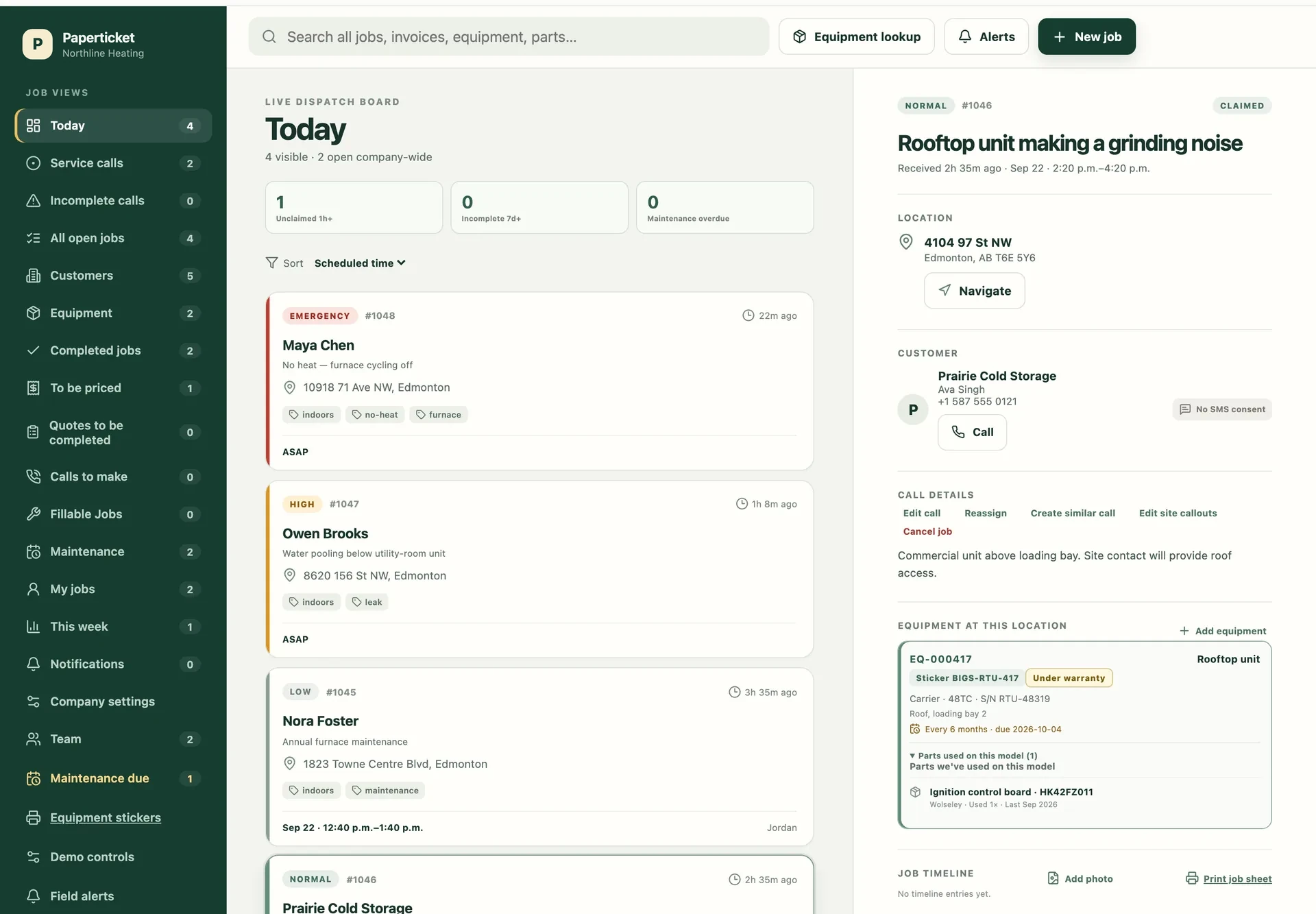
A SHARED PICTURE OF THE DAY
The call on a sticky note. The update in a group text. The invoice in a glove box. Give it all a place your team can find.
Find the customer by phone number, pull up their sites and equipment, and get the next job onto the board.
PHONE-FIRST INTAKEOffer work to the crew or assign a technician. See who accepted, who’s on the way, and what still needs attention.
CLEAR OWNERSHIPRead cached jobs and queue notes, photos and completions offline. Accepting a call and sending a text need a connection.
OFFLINE OUTBOXTWO-WAY SMS UPDATES
Send an ETA from the job. Customer replies stay on the job timeline, and the office gets an alert so it can follow up with the context in view.
Arrival update example
Illustrative text exchange; the demo does not send real messages.
EQUIPMENT KNOWLEDGE
Keep equipment specs, photos and service history with the unit. See which parts your shop fitted to the same make and model, even at another customer’s site.
Equipment record
A familiar unit, even on your first visit.
SEASONAL MAINTENANCE
Keep customer maintenance agreements and enrolled equipment in one place. Preview the work coming due, then generate visits grouped by site and maintenance period.
Seasonal visit example
Less rebuilding the same list each season.
READY FOR THE OFFICE
Keep your paper invoice book. Bring the photo, work performed, parts, time on site and PO number back together so the office can price the work and mark it billed.
Billing handoff example
The context behind the invoice stays with the job.
FOLLOW-THROUGH
Keep Calls to make, quotes and parts follow-up visible. Track ordered and received parts with supplier references, link a booked callback to its job, and see what still needs attention.
THE OWNER’S VIEW
Review completed work and response times alongside the current backlog, maintenance due and work waiting to be priced.
FROM FIRST RING TO WRAPPED UP
Find the customer, capture the problem, and offer or assign the call.
The technician accepts, sees the details, and texts an arrival time.
Record the work, parts and invoice photo before leaving the job.
The office has what it needs to price the work and mark it billed.
TWO-WAY SMS UPDATES
Send an arrival text and keep the customer’s reply with the job. The office can see the conversation and follow up. Pick an arrival time to preview the message.
A clearer arrival. A customer who’s in the loop.
ONE COMPANY. ONE MONTHLY RATE.
Add technicians, dispatchers and owners without per-user fees. For service businesses across Canada.
In the US? getpaperticket.com
Unlimited users and technicians.
14-day free trial. No credit card required. No automatic charges without explicit checkout.
Messaging limits apply. Free trials include about 50 arrival texts from your shop’s own number.
Start your free trialService businesses with a small crew, a busy office and plenty of calls to keep track of. Choose heating and cooling, refrigeration, plumbing, electrical or general service, or several trades at once; each sets starting defaults for equipment, job tags and optional refrigerant fields that you can adjust later. Technicians, dispatchers and owners each have views suited to their work.
Yes. Record the invoice number and photograph the slip at closeout. Completed work then waits in To be priced with the technician’s notes, parts and time on site. The office can mark it priced and billed.
Yes. Send an arrival text from the job and receive customer replies on the job timeline, with alerts for the office. This covers arrival updates and replies, not a general chat inbox. Turn texting on from Company settings; your shop gets its own local number. Texting is available to shops in Canada; it isn’t available for US shops yet. The demo simulates texts.
Paperticket runs in the browser on the phones your crew already carries and on the office computer. Add it to the phone’s home screen for quick access.
Previously loaded jobs remain readable from the phone’s cache. Notes, photos and completions can wait in an outbox until the connection returns. Accepting a call and sending a text need a connection.
The monthly subscription is CA$199/month per company, tax included. New shops start with a 14-day free trial—no credit card required. After the trial, pricing is a flat monthly rate per company with unlimited users and technicians—no per-seat caps and no per-user fees. Creating an account never starts automatic charges without explicit checkout.
Absolutely. The demo uses sample calls and a sample team, with changes saved only in your browser. Switch between office, technician and owner roles, walk through a job, and reset the demo whenever you like. Demo texts are simulated.
YOUR SHOP STARTS HERE
Start your 14-day free trial. Confirm your email, set up your shop, and invite your crew.
Start your 14-day trial on Paperticket. Set up your shop and invite your crew.
Create account 14-day free trial · Flat rate per company, unlimited crew. No credit card required.